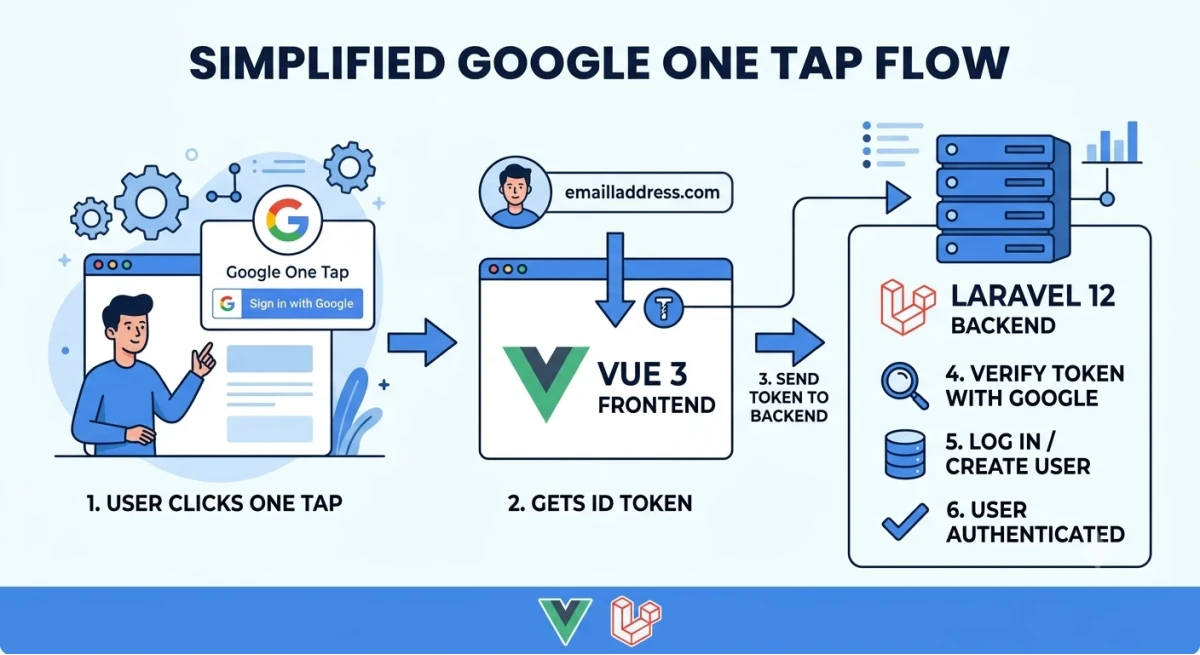
Google One Tap Authentication with Laravel 12 and Vue 3
1. Prerequisites
PHP 8.2+, Composer, Laravel 12 project (API or Laravel + Inertia/Vite SPA)
Node 18+, Vue 3 project (via Vite)
A Google Cloud project
2. Google Cloud Console setup
Go to console.cloud.google.com → create/select a project.
APIs & Services → OAuth consent screen → configure app name, support email, and add your domain(s) once you're ready for production (localhost works fine for testing).
APIs & Services → Credentials → Create Credentials → OAuth client ID.
Application type: Web application
Authorized JavaScript origins: add http://localhost:5173 (Vite dev server) and your production domain, e.g. https://example.com
Authorized redirect URIs: not required for One Tap (only needed for full OAuth redirect flow), but you can leave it blank or add your app URL.
Copy the generated Client ID — you'll need it in both the Vue frontend and Laravel backend.
3. Laravel 12 backend
3.1 Install packages
composer require laravel/sanctum
composer require google/apiclient
google/apiclient gives you Google_Client::verifyIdToken(), which validates the JWT's signature, expiry, and audience against Google's servers — don't verify the JWT manually.
Publish Sanctum's config if not already present:
php artisan vendor:publish --tag=sanctum-config
php artisan migrate
3.2 Environment variables
Add to .env:
GOOGLE_CLIENT_ID=your-client-id.apps.googleusercontent.com

SANCTUM_STATEFUL_DOMAINS=localhost:5173
SESSION_DOMAIN=localhost
FRONTEND_URL=http://localhost:5173
Add to config/services.php:
'google' => [
    'client_id' => env('GOOGLE_CLIENT_ID'),
],
3.3 Migration — allow nullable password, store Google fields
php artisan make:migration add_google_fields_to_users_table --table=users
<?php

use Illuminate\Database\Migrations\Migration;
use Illuminate\Database\Schema\Blueprint;
use Illuminate\Support\Facades\Schema;

return new class extends Migration
{
    public function up(): void
    {
        Schema::table('users', function (Blueprint $table) {
            $table->string('google_id')->nullable()->unique()->after('id');
            $table->string('avatar')->nullable()->after('email');
            $table->string('password')->nullable()->change();
        });
    }

    public function down(): void
    {
        Schema::table('users', function (Blueprint $table) {
            $table->dropColumn(['google_id', 'avatar']);
        });
    }
};
php artisan migrate
3.4 The controller
php artisan make:controller Api/GoogleOneTapController
<?php
// app/Http/Controllers/Api/GoogleOneTapController.php

namespace App\Http\Controllers\Api;

use App\Http\Controllers\Controller;
use App\Models\User;
use Google_Client;
use Illuminate\Http\Request;
use Illuminate\Support\Facades\Hash;
use Illuminate\Support\Str;
use Illuminate\Support\Facades\Validator;

class GoogleOneTapController extends Controller
{
    public function login(Request $request)
    {
        $validator = Validator::make($request->all(), [
            'credential' => ['required', 'string'],
        ]);

        if ($validator->fails()) {
            return response()->json(['message' => 'Missing credential'], 422);
        }

        $client = new Google_Client(['client_id' => config('services.google.client_id')]);

        $payload = $client->verifyIdToken($request->input('credential'));

        if (! $payload) {
            return response()->json(['message' => 'Invalid Google token'], 401);
        }

        // $payload now contains verified claims: sub, email, email_verified, name, picture, ...
        if (empty($payload['email_verified']) && $payload['email_verified'] !== true) {
            return response()->json(['message' => 'Google email not verified'], 401);
        }

        $user = User::where('google_id', $payload['sub'])
            ->orWhere('email', $payload['email'])
            ->first();

        if (! $user) {
            $user = User::create([
                'name' => $payload['name'] ?? explode('@', $payload['email'])[0],
                'email' => $payload['email'],
                'google_id' => $payload['sub'],
                'avatar' => $payload['picture'] ?? null,
                'password' => Hash::make(Str::random(32)), // unusable random password
                'email_verified_at' => now(),
            ]);
        } elseif (! $user->google_id) {
            // Existing account created via normal signup — link it
            $user->update([
                'google_id' => $payload['sub'],
                'avatar' => $user->avatar ?? ($payload['picture'] ?? null),
            ]);
        }

        // Revoke old tokens for this device/session if you want single-token behavior:
        // $user->tokens()->delete();

        $token = $user->createToken('one-tap-token')->plainTextToken;

        return response()->json([
            'user' => $user,
            'token' => $token,
        ]);
    }
}
Why verify server-side? Never trust the JWT payload decoded on the frontend. verifyIdToken() checks the signature against Google's rotating public keys and confirms the token was issued for your client ID, so a forged or replayed token from elsewhere is rejected.
3.5 Routes
// routes/api.php

use App\Http\Controllers\Api\GoogleOneTapController;
use Illuminate\Support\Facades\Route;

Route::post('/auth/google-one-tap', [GoogleOneTapController::class, 'login']);

Route::middleware('auth:sanctum')->get('/user', function (Illuminate\Http\Request $request) {
    return $request->user();
});
3.6 CORS + Sanctum config
config/cors.php:
'paths' => ['api/*', 'sanctum/csrf-cookie'],
'allowed_origins' => [env('FRONTEND_URL', 'http://localhost:5173')],
'supports_credentials' => true,
config/sanctum.php — confirm:
'stateful' => explode(',', env('SANCTUM_STATEFUL_DOMAINS', 'localhost:5173')),
If your Vue app is a separate SPA hitting a token endpoint (as coded above), you're using Sanctum's API token mode, so cookies/CSRF aren't strictly required for this endpoint — just send the returned token as a Bearer token afterward. If instead you want cookie-based SPA auth, call GET /sanctum/csrf-cookie before this request and switch to Auth::login($user) instead of issuing a token.
4. Vue 3 frontend
4.1 Load the Google script once
Add to index.html (simplest, avoids extra npm packages):
<!-- index.html -->
<script src="https://accounts.google.com/gsi/client" async defer></script>
4.2 Environment variable
.env (Vite):
VITE_GOOGLE_CLIENT_ID=your-client-id.apps.googleusercontent.com
VITE_API_BASE_URL=http://localhost:8000
4.3 A small API helper
// src/api.js
import axios from 'axios'

const api = axios.create({
  baseURL: import.meta.env.VITE_API_BASE_URL,
  withCredentials: true,
})

api.interceptors.request.use((config) => {
  const token = localStorage.getItem('auth_token')
  if (token) config.headers.Authorization = `Bearer ${token}`
  return config
})

export default api
4.4 The One Tap component
<!-- src/components/GoogleOneTap.vue -->
<script setup>
import { onMounted, onBeforeUnmount } from 'vue'
import api from '../api'

const emit = defineEmits(['login-success', 'login-error'])

const CLIENT_ID = import.meta.env.VITE_GOOGLE_CLIENT_ID

function waitForGoogle() {
  return new Promise((resolve) => {
    if (window.google?.accounts?.id) return resolve()
    const interval = setInterval(() => {
      if (window.google?.accounts?.id) {
        clearInterval(interval)
        resolve()
      }
    }, 50)
  })
}

async function handleCredentialResponse(response) {
  try {
    // response.credential is the signed JWT from Google
    const { data } = await api.post('/api/auth/google-one-tap', {
      credential: response.credential,
    })

    localStorage.setItem('auth_token', data.token)
    emit('login-success', data.user)
  } catch (err) {
    emit('login-error', err)
  }
}

onMounted(async () => {
  await waitForGoogle()

  window.google.accounts.id.initialize({
    client_id: CLIENT_ID,
    callback: handleCredentialResponse,
    auto_select: false,       // set true to auto sign-in returning users silently
    cancel_on_tap_outside: false,
  })

  // Renders the floating One Tap prompt (top-right corner by default)
  window.google.accounts.id.prompt((notification) => {
    if (notification.isNotDisplayed() || notification.isSkippedMoment()) {
      // One Tap was blocked/skipped (e.g. user dismissed it before, browser settings, etc.)
      console.log('One Tap not shown:', notification.getNotDisplayedReason?.() ?? notification.getSkippedReason?.())
    }
  })
})

onBeforeUnmount(() => {
  window.google?.accounts?.id?.cancel()
})
</script>

<template>
  <!-- This component renders nothing visible itself; the prompt is injected by Google's script.
       Optionally render a real button as a fallback for browsers/users that dismiss One Tap. -->
  <div id="g_id_signin_fallback"></div>
</template>
4.5 Optional: a classic "Sign in with Google" button as a fallback
One Tap can be silently skipped (e.g. the user closed it earlier, or the browser blocks third-party prompts). Render Google's standard button too, so people always have a way in:
<script setup>
import { onMounted } from 'vue'

onMounted(() => {
  window.google.accounts.id.renderButton(
    document.getElementById('g_id_signin_fallback'),
    { theme: 'outline', size: 'large', width: 280 }
  )
})
</script>

<template>
  <div id="g_id_signin_fallback"></div>
</template>
You can merge this into the same component as GoogleOneTap.vue — call both prompt() and renderButton() in onMounted.
4.6 Using it in a page
<!-- src/views/Login.vue -->
<script setup>
import { useRouter } from 'vue-router'
import GoogleOneTap from '../components/GoogleOneTap.vue'

const router = useRouter()

function onLoginSuccess(user) {
  console.log('Logged in as', user)
  router.push('/dashboard')
}

function onLoginError(err) {
  console.error('Google login failed', err)
}
</script>

<template>
  <div class="login-page">
    <h1>Sign in</h1>
    <GoogleOneTap @login-success="onLoginSuccess" @login-error="onLoginError" />
  </div>
</template>
4.7 Fetching the authenticated user later
import api from '../api'

async function fetchUser() {
  const { data } = await api.get('/api/user')
  return data
}
4.8 Logout
function logout() {
  localStorage.removeItem('auth_token')
  window.google?.accounts?.id?.disableAutoSelect() // prevents instant re-prompt with same account
}
Add a matching Laravel route if you want to revoke the token server-side too:
Route::middleware('auth:sanctum')->post('/auth/logout', function (Illuminate\Http\Request $request) {
    $request->user()->currentAccessToken()->delete();
    return response()->json(['message' => 'Logged out']);
});
5. Testing the flow
php artisan serve (backend) and npm run dev (frontend).
Visit the Vue app at http://localhost:5173 — the One Tap card should appear in the top-right corner asking you to continue with a Google account already signed into your browser.
Pick an account → check your Network tab for a POST /api/auth/google-one-tap call returning { user, token }.
Refresh and call GET /api/user with Authorization: Bearer <token> to confirm the session persists.
6. Common issues
Problem: One Tap prompt never appears
Cause / Fix: Origin not in "Authorized JavaScript origins", or you're testing in an Incognito/browser profile with no Google session, or you dismissed it recently (Google suppresses re-prompts for a cooldown period)
Problem: verifyIdToken() returns false
Cause / Fix: Client ID mismatch between frontend initialize() and backend GOOGLE_CLIENT_ID, or expired token (tokens are short-lived — verify immediately after receiving)
Problem: CORS errors on the POST
Cause / Fix: Check config/cors.php allowed_origins matches your Vite dev URL exactly (including port), and supports_credentials is true if you use cookies
Problem: Works locally, not in production
Cause / Fix: Add the production domain to Authorized JavaScript origins in Google Cloud Console, and update FRONTEND_URL / SANCTUM_STATEFUL_DOMAINS
Problem: One Tap keeps reappearing after logout
Cause / Fix: Call google.accounts.id.disableAutoSelect() on logout
7. Optional: combine with full OAuth redirect (Socialite)
One Tap is great for frictionless returning-user login, but some users will still want a full "Sign in with Google" redirect flow (e.g. mobile browsers where One Tap support is limited). For that, pair this with laravel/socialite's standard Google driver as a fallback button, sharing the same google_id column and user-creation logic from GoogleOneTapController.