Google Places API Integration with Laravel 12
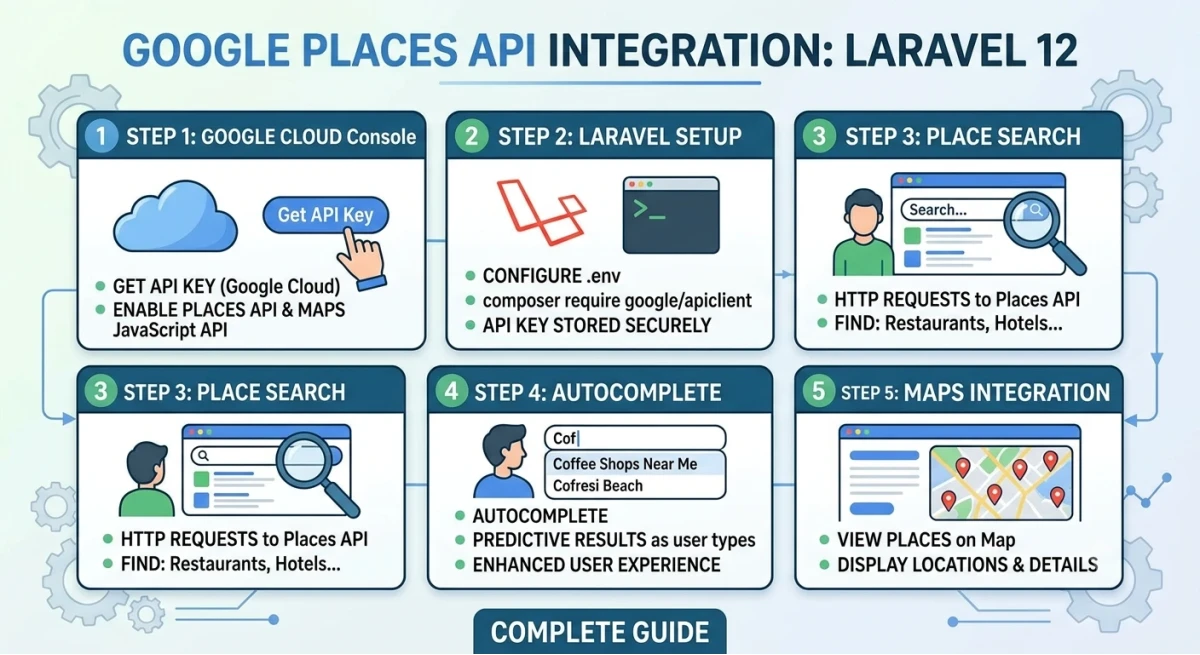
This tutorial shows how to integrate the Google Places API into a Laravel 12 application for address autocomplete.
Step 1: Create a Laravel 12 Project
Create a new Laravel 12 project using Composer.
composer create-project laravel/laravel google-places-app
cd google-places-app
Step 2: Get a Google Places API Key
Go to the Google Cloud Console, create a project, enable the "Places API" and "Maps JavaScript API", then generate an API key under Credentials.
Step 3: Add the API Key to Environment File
Open the .env file and add the following line.
GOOGLE_MAPS_API_KEY=your_api_key_here
Step 4: Create Config Entry
Open config/services.php and add the key inside the returned array.
'google' => [
    'places_api_key' => env('GOOGLE_MAPS_API_KEY'),
],
Step 5: Create a Route
Open routes/web.php and add a route to load the form page.
use App\Http\Controllers\PlaceController;

Route::get('/place', [PlaceController::class, 'index']);
Step 6: Create the Controller
Generate a controller using Artisan.
php artisan make:controller PlaceController
Update the controller to pass the API key to the view.
namespace App\Http\Controllers;

use Illuminate\Http\Request;

class PlaceController extends Controller
{
    public function index()
    {
        $apiKey = config('services.google.places_api_key');
        return view('place', compact('apiKey'));
    }
}
Step 7: Create the Blade View
Create resources/views/place.blade.php with an input field and the Google Maps script.
<!DOCTYPE html>
<html>
<head>
    <title>Google Places Autocomplete</title>
</head>
<body>

    <input id="autocomplete" type="text" placeholder="Enter your address">

    <script src="https://maps.googleapis.com/maps/api/js?key={{ $apiKey }}&libraries=places"></script>
    <script>
        const input = document.getElementById('autocomplete');
        const autocomplete = new google.maps.places.Autocomplete(input);

        autocomplete.addListener('place_changed', function () {
            const place = autocomplete.getPlace();
            console.log(place);
        });
    </script>

</body>
</html>
Step 8: Run the Application
Start the Laravel development server and open the route in a browser.
php artisan serve
Visit http://127.0.0.1:8000/place and start typing an address to see the autocomplete suggestions.
Step 9: Save Selected Place Data (Optional)
To save the selected place, send the place data to a backend route using fetch or axios, then store it in a database table with fields like address, latitude, and longitude.
Conclusion
This completes a basic Google Places API integration in Laravel 12, covering API key setup, configuration, controller, and a working autocomplete view.