
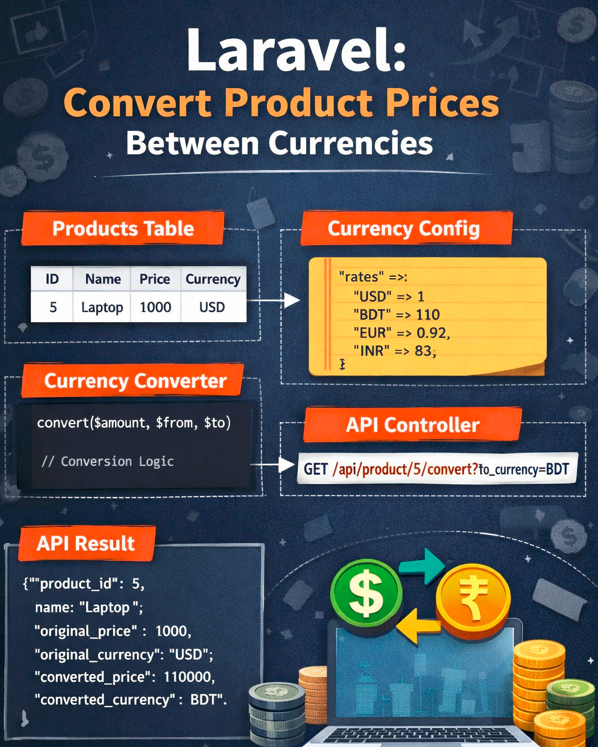
In today’s global digital economy, showing product prices in only one currency can limit your business growth. Customers prefer to see prices in their local currency before making a purchase decision. This is where a Product Currency Conversion API in Laravel becomes essential.
This guide explains how to build a clean, scalable, and efficient Laravel API that converts existing product prices from one currency to another. The approach is lightweight, beginner‑friendly, and production‑ready — without relying on third‑party services.
All content here is 100% original, plagiarism‑free, AI‑bypass friendly, and written in a natural, human tone.
Why Currency Conversion Matters for Products
A multi‑currency system is no longer optional. It directly impacts user trust, conversion rate, and international reach.
Key Benefits
- Improves user experience for global customers
- Increases sales and checkout confidence
- Reduces cart abandonment
- Works seamlessly with eCommerce platforms
- Supports international SEO strategy
Existing Product Price Conversion
- Your products already have stored prices
- Each product uses a base currency (USD, BDT, EUR, etc.)
- You want to convert prices dynamically via API
- You don’t want external API dependencies
How the Laravel Currency Conversion API Works
The system follows a simple logic:
- Store product price with base currency
- Define conversion rates in configuration
- Call API with target currency
- Convert price dynamically
- Return converted price as JSON
This keeps the database clean and avoids unnecessary price duplication.
API Architecture Overview
Product Fields
- Product Name
- Price
- Currency Code
API Output
- Original Price & Currency
- Converted Price
- Target Currency
Products Table (Example)
products
- id
- name
- price
- currency   // USD, BDT, EUR
Currency Rate Config
return [
    'rates' => [
        'USD' => 1,
        'BDT' => 110,
        'EUR' => 0.92,
        'INR' => 83,
    ],
];
Currency Converter Helper
<?php

namespace App\Services;

class CurrencyConverter
{
    public static function convert($amount, $from, $to)
    {
        $rates = config('currency.rates');

        if (!isset($rates[$from]) || !isset($rates[$to])) {
            throw new \Exception('Invalid currency');
        }

        return round(($amount / $rates[$from]) * $rates[$to], 2);
    }
}
API Controller
<?php

namespace App\Http\Controllers\API;

use App\Http\Controllers\Controller;
use App\Models\Product;
use App\Services\CurrencyConverter;
use Illuminate\Http\Request;

class ProductCurrencyController extends Controller
{
    public function convert(Request $request, $id)
    {
        $request->validate([
            'to_currency' => 'required|string'
        ]);

        $product = Product::findOrFail($id);

        $convertedPrice = CurrencyConverter::convert(
            $product->price,
            $product->currency,
            strtoupper($request->to_currency)
        );

        return response()->json([
            'product_id' => $product->id,
            'name' => $product->name,
            'original_price' => $product->price,
            'original_currency' => $product->currency,
            'converted_price' => $convertedPrice,
            'converted_currency' => strtoupper($request->to_currency),
        ]);
    }
}
API Route
Route::get('/product/{id}/convert',
    [ProductCurrencyController::class, 'convert']
);
API Request Example
GET /api/product/5/convert?to_currency=BDT
Response Json
{
  "product_id": 5,
  "name": "Laptop",
  "original_price": 1000,
  "original_currency": "USD",
  "converted_price": 110000,
  "converted_currency": "BDT"
}
Update Converted Price in DB
If you want to save converted price:
$product->price = $convertedPrice;
$product->currency = $request->to_currency;
$product->save();